

Built-in and custom agents
- Built-in agents power Research, Slack, PR review, repository learning, and security hunts. You can change their model and reasoning level for your organization. Click Reset to default to undo.
- Custom agents are yours. You control everything, including the prompt and tools.
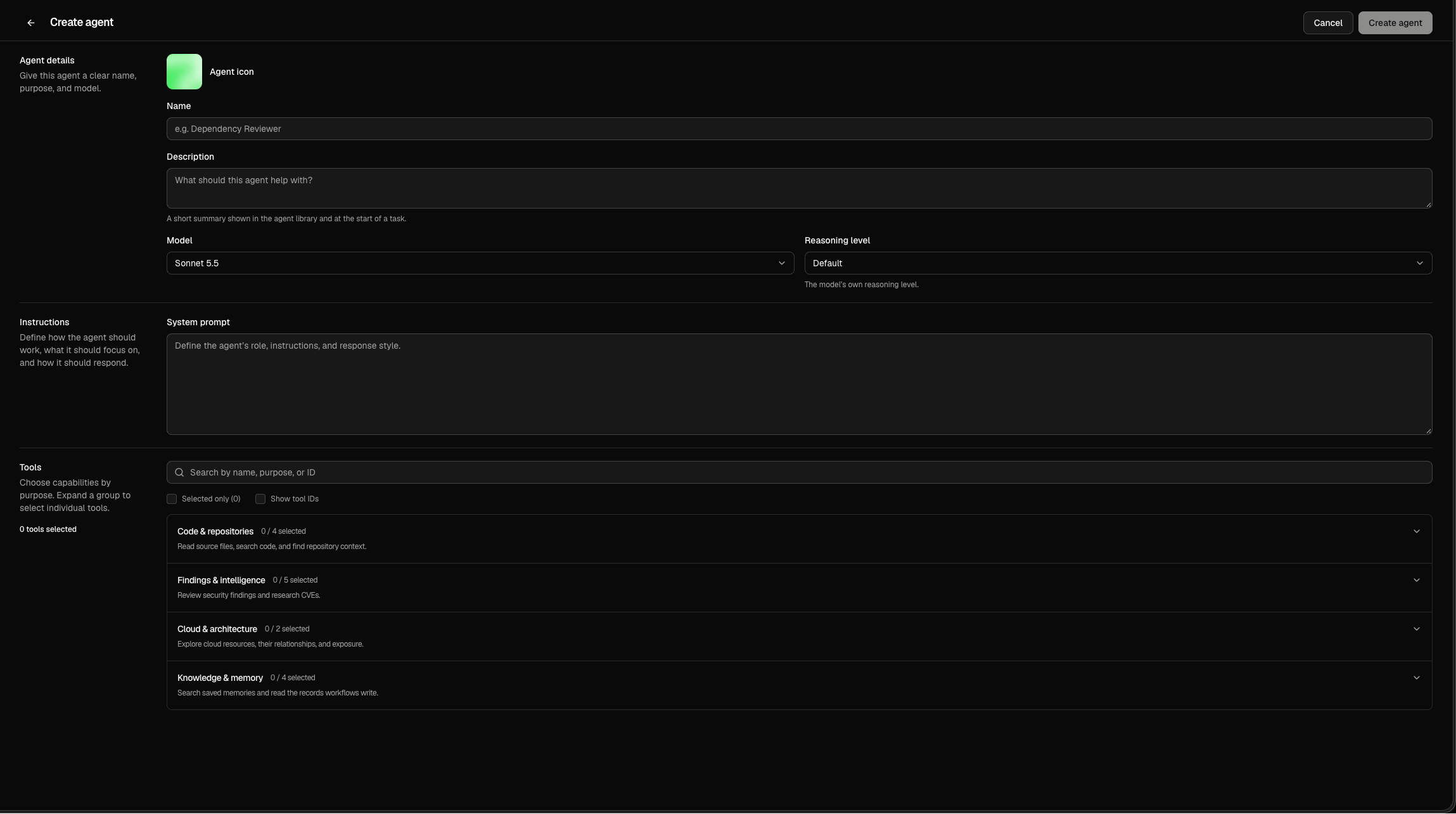
Create an agent
1
Open the form
Click Create agent.
2
Describe the agent
Enter a Name, an optional Description, and pick a Model and Reasoning level.
3
Write the instructions
In System prompt, define the agent’s role, focus, and how it should respond.
4
Pick tools and save
Select the tools it needs, then click Create agent.
Models
The default is Sonnet 5.5.
Reasoning level sets how much the model thinks before it answers: Default, Low, Medium, High, Extra high, or Max. Higher is slower and costs more. It isn’t available for Haiku 5.5 or the Kimi, GLM, and DeepSeek models.
Tools
Use the search box to find a tool, or check Show tool IDs to see each tool’s ID.