

How Enclave collects dependencies
Enclave scans a repository’s dependencies when the repository connects, and again when a push to its default branch, such as a merged pull request, changes a dependency file like a lockfile or manifest. You don’t need to set anything up. Each scan reads the repository’s lockfiles. If a manifest has no lockfile, Enclave resolves it to the versions a fresh install would get. If that fails, it keeps the versions as written in the manifest. The repository’s own packages, such as workspace packages, aren’t listed. Supported ecosystems are npm, PyPI, Go, Cargo, Maven, RubyGems, Packagist, and NuGet. Enclave checks every pinned version against the OSV vulnerability database. New advisories show up without a new push.Find a package
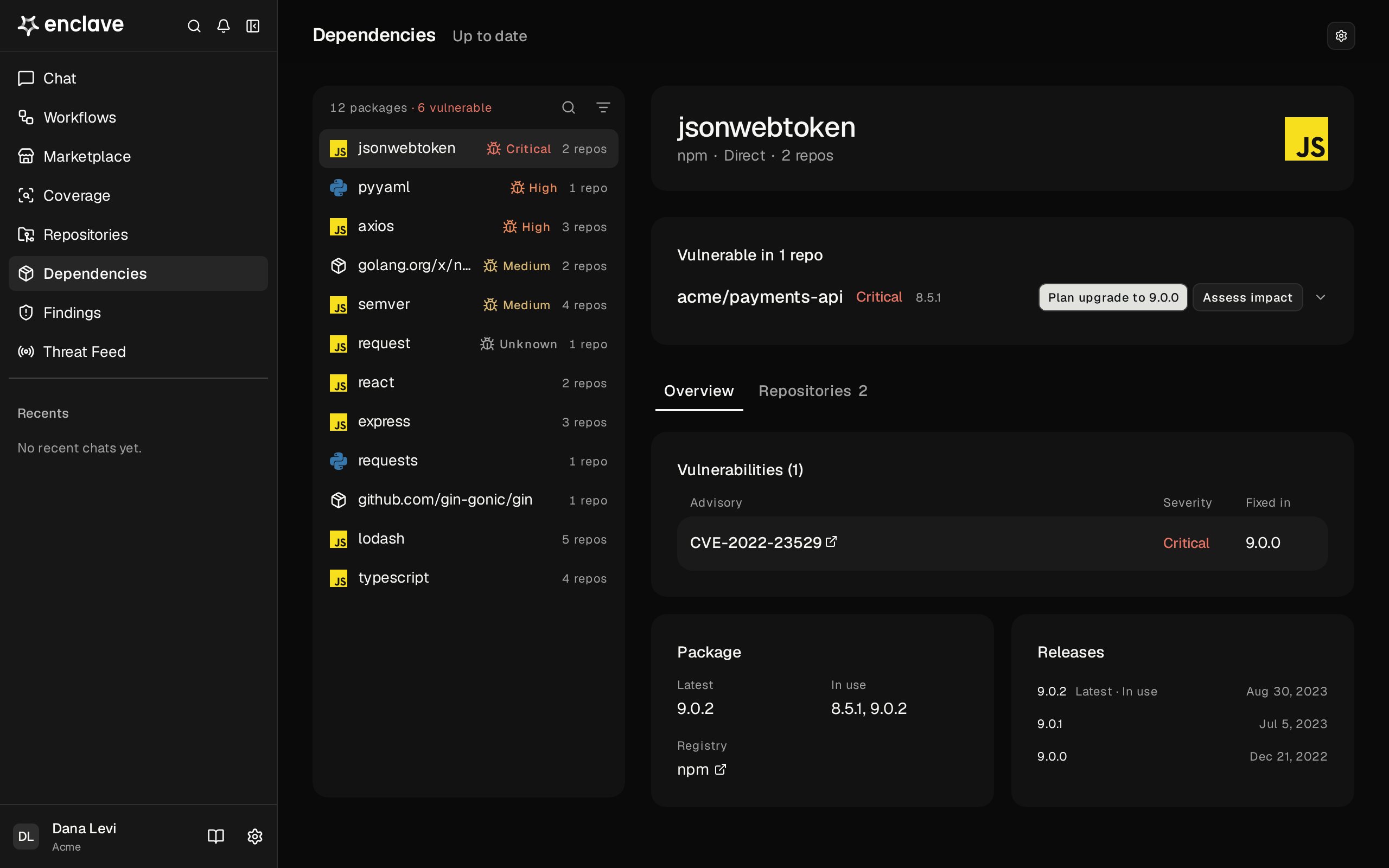
Vulnerable packages come first, worst severity first, marked with a bug icon and their severity in its color, or Unknown when no advisory rates it. Each row also shows how many repositories use the package. The rest follow by how many repositories use them. Click the search icon to search by package name. Click the filter icon to filter by Vulnerability, Ecosystem, Type (Direct or Transitive), or Repository. Vulnerability lists only vulnerable packages: choose Any severity, or a minimum such as High or worse.Scan status
The top right of the page shows when the last scan ran, and how many repositories are in each of these states:- Updating: a scan is running. The page refreshes on its own.
- Out of date: the default branch has a newer commit than the last scan, and the new scan failed or didn’t start. The results are from an earlier commit.
- Not scanned: the repository has never been scanned, for example because it connected before dependency scanning existed or its first scan failed.
Turn dependency scans on or off
Dependency scans are on for every repository by default. You need the Owner or Admin role to change them. Turning a repository’s scans off stops scanning it and removes its packages from Dependencies. Enclave asks you to confirm first.- One repository: use the Auto dependency scans switch on the repository’s Scan tab, or the Auto dependency scans switch in its row on Repositories. Click Repositories at the top of the page to open it. Turning scans on scans the repository right away.
- Every repository: click Dependency scans at the top of the page, then Turn off for or Turn on for the number of repositories shown. Repositories you turn on this way show as Not scanned until you click Scan or someone pushes to their default branch.
- Forks: turn off Scan forks at the top of the page to stop scanning every fork, including forks connected later. It’s on by default.
Review a package
Click a package to open it. If any repository pins a vulnerable version, Vulnerable in N repos lists each one with its vulnerable versions. Expand a repository to see its last scan, each file that pins the package, and each advisory with its severity and fixed version. A file without a lockfile shows where its version came from: Resolved at scan or Declared only. A declared version may not be the one installed. Each vulnerable repository has two buttons. Both open a Research session with the repository attached:- Plan upgrade to version, for example Plan upgrade to 1.2.6, names the newest version the advisories are fixed in. The session checks for breaking changes and gives you the exact manifest and lockfile changes. When an advisory has no fixed version, the button says Plan a fix and recommends a replacement package or a mitigation where no upgrade exists.
- Assess impact checks whether the repository uses the vulnerable code and whether untrusted input can reach it, then tells you how exposed it is and how urgently to fix it.
To ask OSV for new advisories now, click Check advisories in the package header.