

What a notification contains
Each message lists up to ten findings, the most severe first, and counts the rest. For each finding, it shows:- The title, linked to the finding in Enclave.
- The severity.
- The repository, when the finding has one.
Post findings to Slack
You need the Owner or Admin role. Members can see the channel, but can’t change it.1
Connect Slack
Open Settings → Notifications. If Slack isn’t connected yet, click Connect Slack. See Slack for what the connection needs. Slack returns you to Settings → Notifications with the channel list already open.
2
Choose a channel
If the channel list isn’t open, turn on Slack. Choose a channel from the list. Channels under Enclave is in come first. Enclave joins a channel under Enclave will join when you choose it.To post to a private channel, invite @Enclave to it in Slack first. It then appears in the list.
If you see Reconnect Slack to pick a channel Enclave isn’t in yet, your Slack install predates this feature. You can still choose a channel under Enclave is in. Other channels are listed under Invite @Enclave first, or reconnect Slack and can’t be chosen. Invite @Enclave to the channel in Slack, or click Reconnect and approve the new permission.
Get findings by email
Finding emails are on by default for every member. Each member controls their own emails in Settings → Notifications. When emails are on, the page shows the address they go to. You only get findings you can see. Your role must allow you to view findings, and the finding’s repository must be visible to you. Findings from a personal connection reach only the member who owns it. See Roles and permissions. The setting applies to the current organization. If you belong to several organizations, turn it on or off in each one.Get findings as Slack DMs
Slack DMs are off by default. The Slack DM switch appears in Settings → Notifications once your organization has connected Slack. Each member turns their own DMs on or off. When Slack DM is on, the Enclave app sends you the same message the channel gets. Enclave finds your Slack account by your Enclave email. The account must be in your organization’s Slack workspace, and Slack must have confirmed its email. As with email, you only get findings you can see, and the setting applies to the current organization.The notification bell
The bell at the top of the sidebar collects what needs your attention in Enclave, such as mentions and workflow runs that ended. A badge shows how many entries you haven’t read.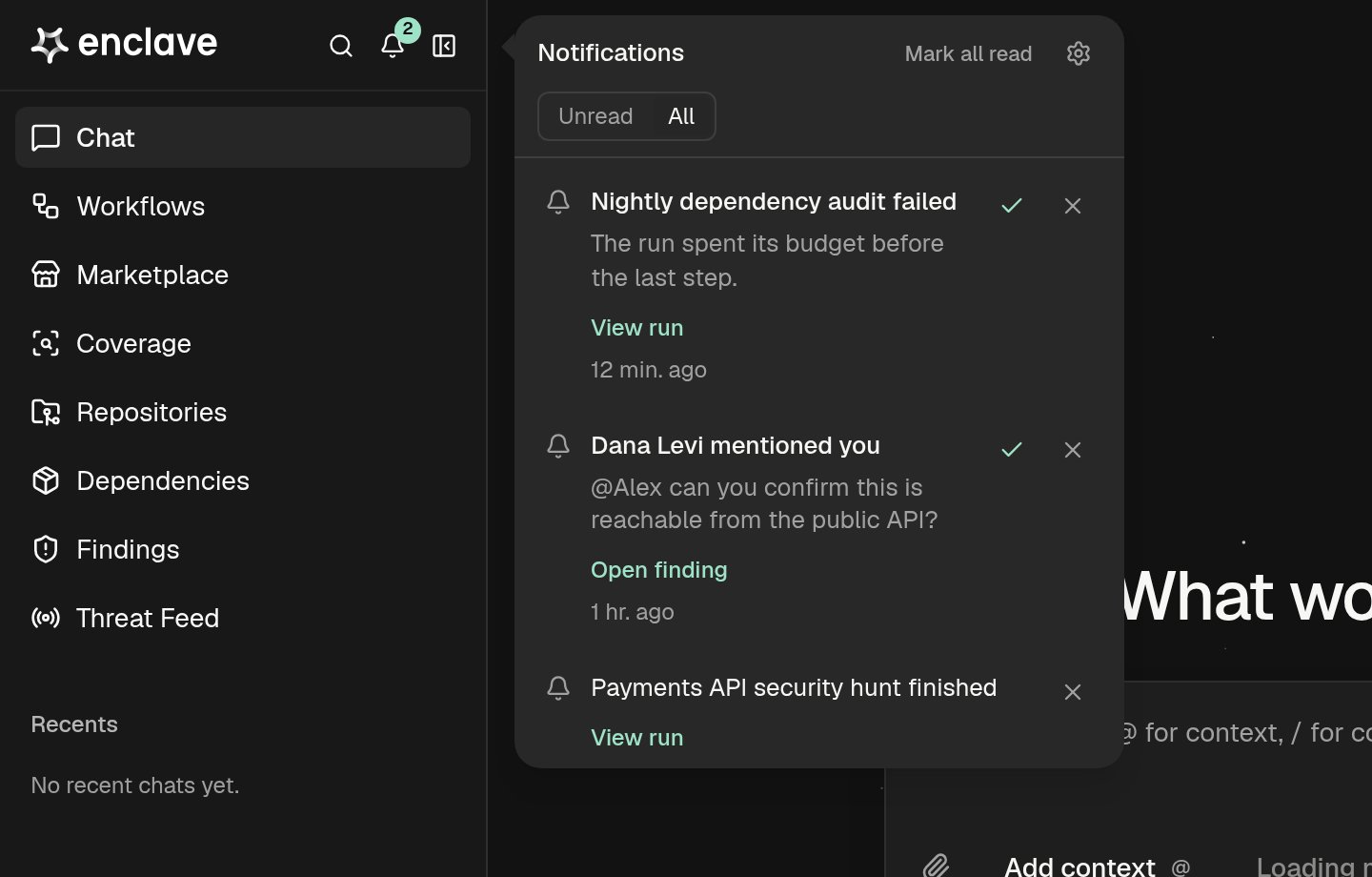
- The bell opens on Unread. Click All to also see entries you’ve read.
- Click an entry’s link, such as Open finding or View run, to open it and mark it read.
- Click the check mark to mark one entry read, or Mark all read to mark every entry read.
- Click × to dismiss an entry. It leaves your bell for good.
- Click the gear to open Settings → Notifications.
Troubleshooting
The channel I want isn't in the list
The channel I want isn't in the list
Private channels appear only after you invite @Enclave to them in Slack. Channels shared with another organization and archived channels never appear.
A channel in the list can't be chosen
A channel in the list can't be chosen
Your Slack install can’t join channels yet. Invite @Enclave to the channel in Slack, or reconnect Slack in Settings → Notifications and approve the new permission.
"you@example.com has no account in the Acme Slack workspace."
"you@example.com has no account in the Acme Slack workspace."
Enclave couldn’t find a Slack account with your Enclave email in your organization’s workspace, so it can’t turn on Slack DMs. Use the same email in Slack and Enclave, and confirm it in Slack. Then turn on Slack DM again.
"Slack no longer accepts Enclave's token. Connect Slack again."
"Slack no longer accepts Enclave's token. Connect Slack again."
Enclave was removed from your Slack workspace, or its access was revoked. Reconnect Slack in Settings → Integrations → Slack, then choose the channel again.
"Enclave can't post in that Slack channel."
"Enclave can't post in that Slack channel."
The channel was deleted or archived, or Enclave can no longer post in it. Choose another channel.